
Newsletter Subscribe
Enter your email address below and subscribe to our newsletter
Enter your email address below and subscribe to our newsletter

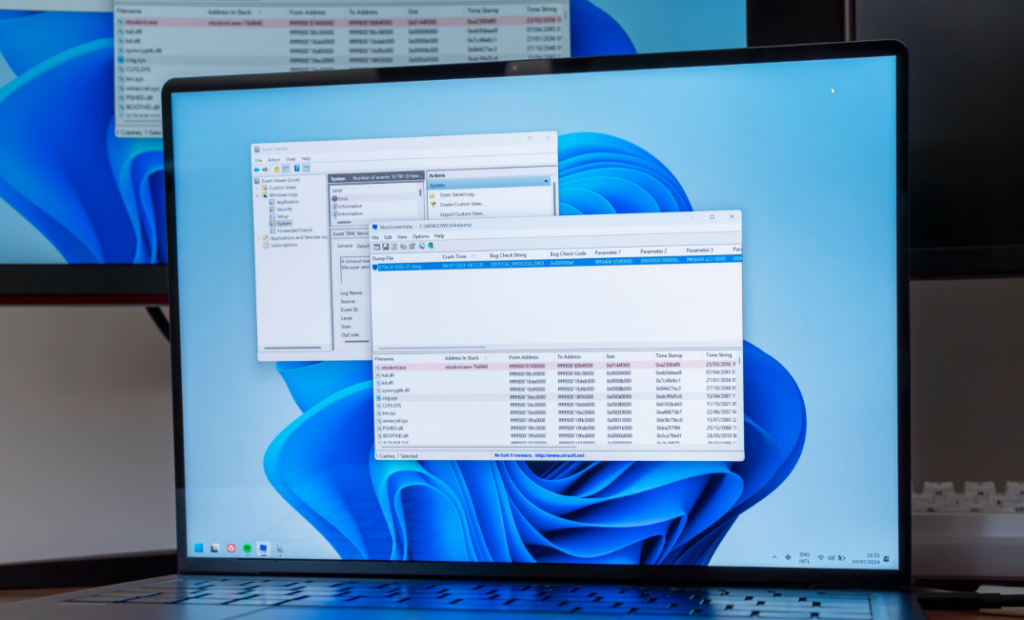
Bluescreenview is a highly effective tool designed to help users understand and fix Windows system crashes, commonly known as Blue Screen of Death (BSOD) errors. These crashes can be frustrating, especially when they happen unexpectedly and without clear explanation. Bluescreenview simplifies this process by giving users a clear and detailed view of what caused the crash.
In today’s digital world, computers are used for everything from work to entertainment. When a system crashes, it can lead to lost data, reduced productivity, and stress. Bluescreenview helps users quickly identify the problem so they can take action and prevent future crashes.
Bluescreenview is a lightweight Windows utility that scans and analyzes minidump files created during system crashes. These files contain valuable information about the cause of the crash, including error codes and driver details.
Instead of going through complicated system logs, Bluescreenview presents all the information in a simple and organized interface. This makes it easier for both beginners and advanced users to understand what went wrong.
The tool does not require installation and can be used directly, making it convenient and portable. This means users can carry it on a USB drive and use it on multiple systems.
Bluescreenview works by accessing minidump files stored in the Windows system directory. These files are automatically created when a crash occurs and contain technical details about the error.
When you run Bluescreenview, it scans these files and displays a list of crashes along with important details such as:
The tool highlights the drivers that may have caused the crash, making it easier to identify the source of the problem. Users can then take appropriate steps, such as updating or removing the faulty driver.
This process is fast and efficient, allowing users to diagnose issues within seconds.
Bluescreenview offers several features that make it a must-have tool for troubleshooting system crashes.
One of its main features is automatic scanning of minidump files. This saves time and eliminates the need for manual searching.
Another important feature is driver highlighting. The tool identifies and marks drivers that are likely responsible for the crash.
It also provides detailed crash information, including error messages and system data. This helps users understand the issue more clearly.
Bluescreenview is also portable, meaning it does not require installation. Users can run it directly from any location.
The interface is simple and easy to use, making it suitable for both beginners and professionals.
Using Bluescreenview comes with many advantages that make troubleshooting easier and faster.
One major benefit is time-saving. Instead of spending hours trying to figure out what caused a crash, users can get answers within seconds.
Another benefit is accuracy. Bluescreenview provides precise information about the crash, reducing guesswork.
It also improves system stability. By identifying and fixing faulty drivers, users can prevent future crashes.
The tool is lightweight and does not consume many system resources, making it suitable for all types of computers.
Additionally, it is free to use, which makes it accessible to everyone.
Regular system maintenance is important for keeping a computer running smoothly. Bluescreenview plays a key role in this process by helping users identify hidden issues.
Many system crashes are caused by outdated or corrupted drivers. Bluescreenview helps detect these problems early so they can be fixed before causing serious damage.
It also helps users understand patterns in crashes. For example, if the same driver appears in multiple crashes, it is likely the main cause.
By using Bluescreenview regularly, users can maintain a stable and reliable system.
Bluescreenview helps identify various causes of system crashes. Some of the most common ones include:
Faulty drivers are one of the leading causes of BSOD errors. These can include outdated, corrupted, or incompatible drivers.
Hardware issues such as faulty RAM or overheating components can also lead to crashes.
Software conflicts may occur when different programs interfere with each other.
Malware or viruses can damage system files and cause instability.
System updates that are not properly installed can also result in errors.
By identifying these causes, Bluescreenview helps users take the right steps to fix the problem.
Using Bluescreenview is simple, but following best practices can improve results.
First, run the tool after a crash to analyze the latest minidump files.
Look for highlighted drivers, as they are likely the cause of the issue.
Search for the error code online to understand the problem better.
Update or reinstall drivers that are causing issues.
Keep your system updated to avoid compatibility problems.
Using these steps, users can effectively diagnose and fix system crashes.
Bluescreenview is designed to be useful for both beginners and advanced users.
For beginners, the simple interface makes it easy to understand crash data without technical knowledge.
For professionals, the detailed information allows for deeper analysis and advanced troubleshooting.
This flexibility makes Bluescreenview a versatile tool for all types of users.
While Bluescreenview is a powerful tool, it does have some limitations.
It only analyzes minidump files, so it may not provide complete information in all cases.
It does not automatically fix issues; users need to take action based on the analysis.
Advanced users may require additional tools for deeper debugging.
Despite these limitations, Bluescreenview remains highly effective for most common issues.
As technology continues to evolve, system diagnostic tools like Bluescreenview will become even more advanced.
Future updates may include better integration with modern operating systems and improved analysis features.
Artificial intelligence may also be used to provide automatic solutions based on crash data.
Bluescreenview is expected to remain a valuable tool for diagnosing and fixing system errors.
Bluescreenview is a powerful, lightweight, and easy-to-use tool that helps users analyze and fix Windows crash errors. It simplifies the process of understanding BSOD issues and provides clear insights into the causes of system failures.
Whether you are a beginner or an experienced user, Bluescreenview offers the tools needed to maintain system stability and prevent future crashes. It saves time, improves accuracy, and makes troubleshooting much easier.
By using Bluescreenview regularly, you can ensure that your system runs smoothly and efficiently without unexpected interruptions.